Profile feature: Roof Type and Roof Age
 Updated
by
Jill Bowers
Updated
by
Jill Bowers
When this profile feature is on, the Roof Type and Roof Age fields are visible in projects. You can find these fields by navigating to Claim Info > Coverage & Loss > Loss Reporting. If this profile feature and the Roof Type and Age Editable profile feature are both enabled, then the Roof Type and Roof Age fields are also editable.
Enter numbers in the Roof Age field to record the roof’s age.
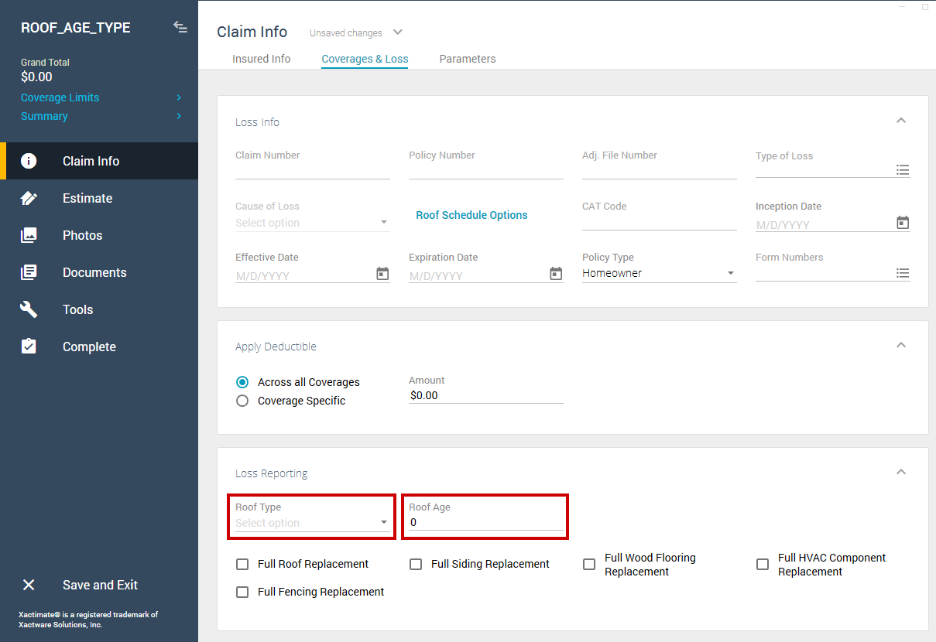
Select the dropdown menu in the Roof Type field to choose from a list of roof types:
- Composition
- Slate
- Tile
- Wood
- Metal
- Other