Opt into XactLink for carriers in XactAdmin - Profiles
 Updated
by
Jill Bowers
Updated
by
Jill Bowers
XactLink allows contractors to securely send projects directly to carriers without a program agreement in place. Instance administrators and profile owners can configure XactLink settings in XactAdmin under Instances and Profiles, respectively.
Note: This document provides instructions on how carriers can opt into XactLink in Profiles. To learn how contractors can configure XactLink in Instances, read our Configure XactLink for contractors in XactAdmin – Instances document.
Profile owners can opt to add themselves to a list of carriers that contractors can send assignment requests to via XactLink by following the steps below.
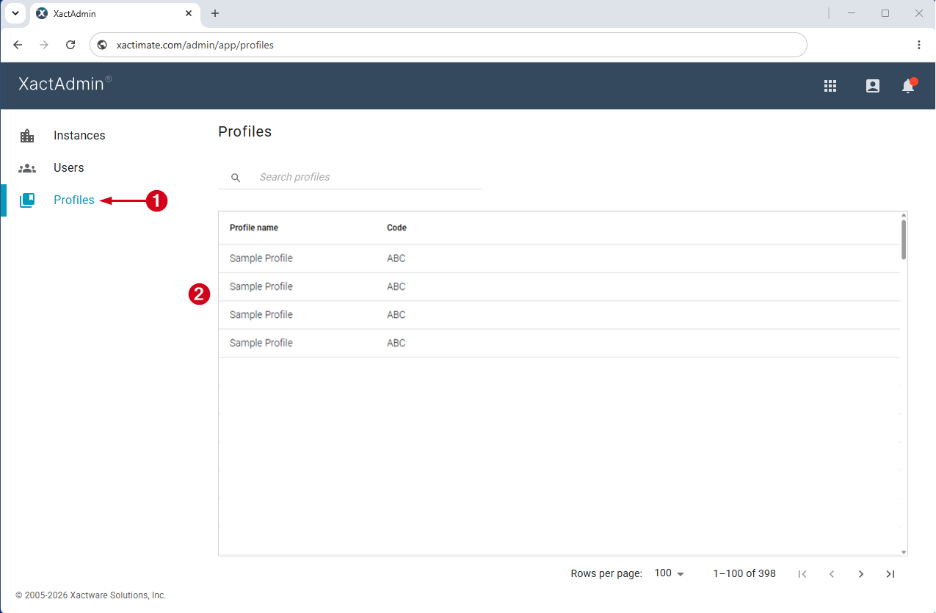
- From within XactAdmin, select Profiles.
- Select your profile from the Profiles table.
Note: If you only have one profile, no Profiles table appears and you are taken directly to the Depreciation tab.
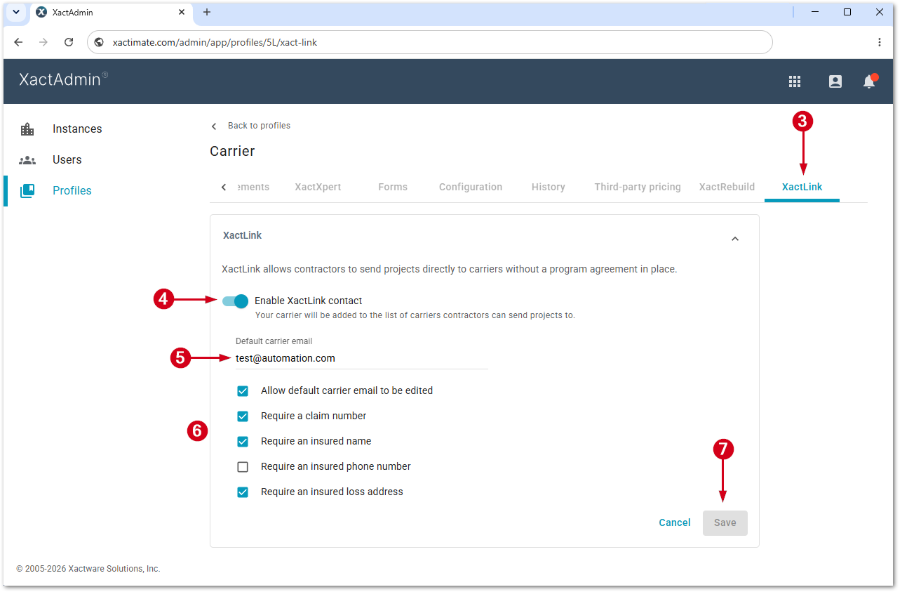
- Select the XactLink tab.
Note: Depending on your settings, you may need to scroll to find the XactLink tab.
- In the XactLink section, select Enable XactLink contact.
- Enter the default carrier email.
- Select any of the following checkboxes as desired:
- Allow default carrier email to be edited
- Require a claim number
- Require an insured name
- Require an insured phone number
- Require an insured loss address
- Select Save.