Labor Efficiencies in Xactimate mobile
 Updated
by
Heather Jones
Updated
by
Heather Jones
About labor efficiencies
Because labor is often the largest variable in a project, we expanded the available labor efficiency models within Xactimate to help you accurately estimate costs for a project. Each labor efficiency calculates labor for individual line items differently based on the typical labor costs and the efficiency assumptions.
Depending on your version of Xactimate and the price list you have selected, your labor efficiency options vary. In older versions of Xactimate, you cannot choose a labor efficiency from a menu; you must instead select New Construction for a total rebuild or leave it unselected for general restoration or remodel (see the descriptions of each labor efficiency later in this document). If you select a price list that is older than February 2026, Large Restoration / Remodel is not an option.
For more information on labor efficiencies, see our Labor Efficiencies Design white paper.
Restoration / Remodel / Service
The Restoration / Remodel / Service (Restoration/Service/Remodel in older price lists) efficiency is typical for most projects in which the work is on an existing structure. The site may be occupied and may require coordinated deliveries and work schedules.
Large Restoration / Remodel
The Large Restoration / Remodel efficiency is typical for larger restoration or remodel projects that are easily accessible for workers and are separated from adjacent finished areas. The site is typically not occupied, and deliveries and work can be scheduled with minimal obstacles.
Total Rebuild or Similar
The Total Rebuild or Similar (Total rebuild or similar in older price lists) efficiency replaces the previous New Construction option (which was available as a checkbox under Claim Info > Parameters > Pricing for desktop and online or More > Pricing for mobile). This efficiency is typical for large projects, such as for ground-up rebuilds and new builds, that are easily accessible for workers and are separated from finished areas. The site typically has open access and is not occupied; deliveries and work can be scheduled freely by the contractor.
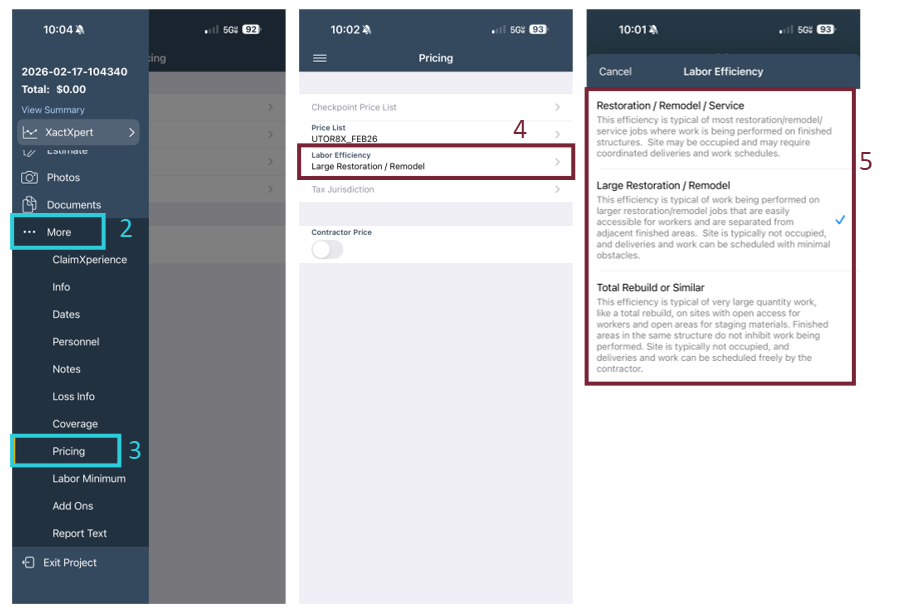
Note: You can find similar descriptions for the labor efficiencies by selecting the Labor Efficiency field.
Select a labor efficiency
To select the labor efficiency, complete the following:
- Within the project, select the three lines in the upper left to open the navigation menu.
- Select More.
- Select Pricing.
- Select Labor Efficiency.
- Select the appropriate labor efficiency.