Mirroring in XactXpert
 Updated
by
Mara K
Updated
by
Mara K
If you are an instance admin or profile owner, you can use mirroring to share XactXpert rules across multiple instances or profiles. You can set up rules in a source instance that are mirrored in child instances. Any existing rules in the child instances are overwritten by the rules in the source instance.
Mirror rules
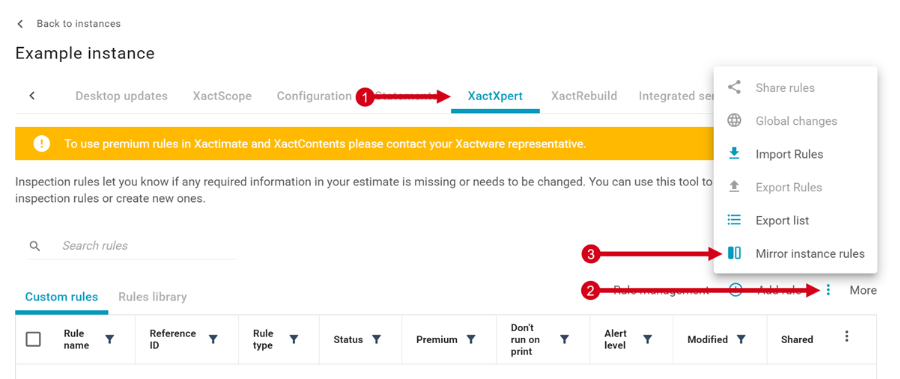
- Navigate to the XactXpert tab from either the Profiles or Instances page in Xactimate Admin.
- Select the More icon (the three dots).
- Select Mirror profile rules or Mirror instance rules. A drawer opens that lists the instances or profiles you have access to.
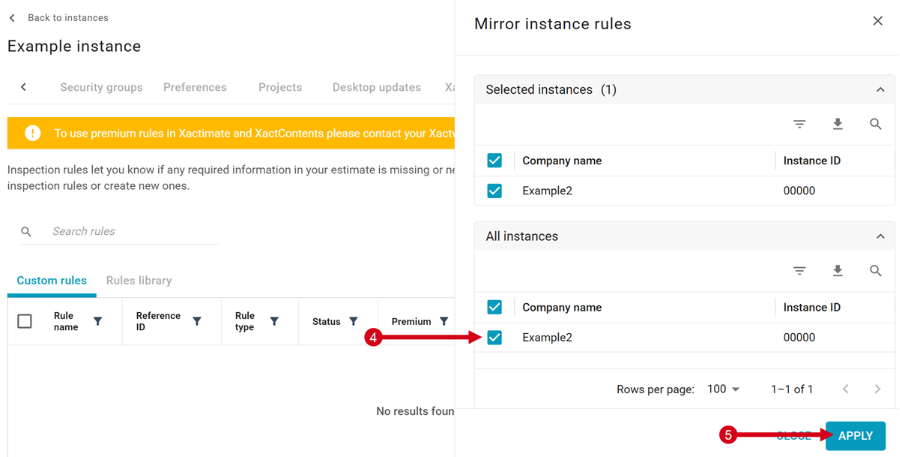
- Select the instances or profiles in the All instances section that you want to mirror rules to.
Note: Grayed-out instances or profiles in the list are already children of other parent instances or profiles.
Note: You can filter the list by company name or instance/profile ID.
- After you select your child instances, click Apply.
- Select OK in the Are you sure? window.
Note: Select the Export icon in either the All profiles or Selected profiles section to download a .csv file with that section’s instances or profiles.
Un-mirror rules
- Navigate to the XactXpert tab from either the Profiles or Instances page in Xactimate Admin.
- Select the More icon (the three dots).
- Select Mirror profile rules or Mirror instance rules. A drawer opens that lists the instances or profiles that the user has access to.
- Deselect the instances or profiles you want to remove mirroring from.
Note: You can see all currently selected instances or profiles in the Selected instances section.
- Select Apply to remove mirroring from those child instances or profiles.
- Select OK in the Are you sure? window.